Open the free connection troubleshooter and choose the wired connection symptom. Log whether Wi-Fi on the same router works and whether another Ethernet lead changes the result.

1. Make sure the test is actually using Ethernet
Keep the cable connected. With any important work saved, turn off Wi-Fi briefly on that device and retry the original task and two unrelated sites. Turn Wi-Fi back on afterwards. If the task only works with Wi-Fi on, start with the wired path. If both sites and the original task work and only the status badge complains, record the mismatch before changing settings.
Check another device on the same network. A phone on mobile data does not count for this comparison. If only the wired laptop fails, keep attention on that device, its adaptor and the path to the router. If other devices also fail, check the shared connection.
2. Check the link and swap one physical part at a time
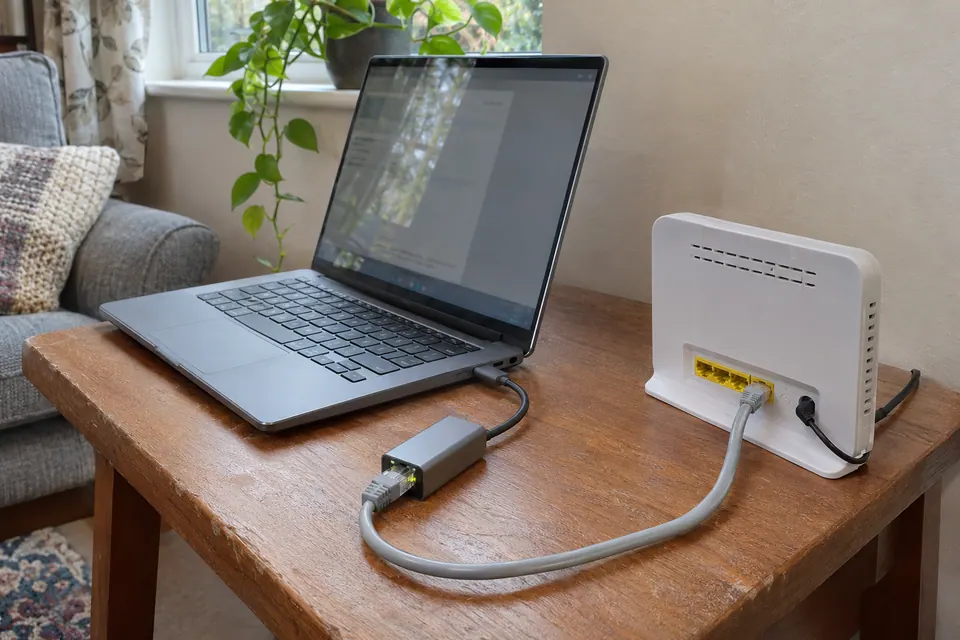
Look at the Ethernet status in the device's network settings and, where the hardware has them, the link lights at both ends. A link light means the two nearby ports established a link; it cannot tell you whether websites will work. If the device says disconnected, reseat the lead and confirm it reaches a router LAN port, not the WAN port.
Use a short, known-good lead in the same LAN port first. If the fault remains, try another suitable LAN port with that same lead. Retest after each swap. When a direct connection works, put the wall socket, switch or USB-C dock back into the path one part at a time. A managed office port may require authorisation or belong to another network; ask the administrator before moving shared connections.
3. Read the IP address and gateway before changing settings
Open the details for the active Ethernet adaptor and look for its IPv4 address and default gateway. On Windows, Settings › Network & internet › Ethernet is a starting point. On a Mac, look under System Settings › Network › Ethernet › Details › TCP/IP. The gateway is often labelled Router on a Mac.
If your network normally assigns IPv4 settings automatically, an address starting 169.254. suggests the expected DHCP lease did not arrive. This is a clue about addressing, not proof of a dead cable. A working IPv6 connection can coexist with that address. Compare the same lead and port with another device you manage. If the failure follows one device, check whether it is meant to obtain its settings automatically. Don't copy a static address from a forum or change a managed IP profile.
4. Separate a website or DNS problem from a lost connection
If the router's local page opens at the gateway address shown by your device, the local path works for that request. Some routers don't expose an admin page on every network, so a page that won't open is not conclusive. If the original site alone fails, check the exact browser error and try the same URL elsewhere.
If several sites show a name lookup error, record it and try those same sites on another device using the same network. DNS translates names to addresses; a lookup error can also occur if your device can't reach its resolver. A failed visit to a bare IP address is not a reliable DNS test for modern sites. Leave workplace DNS and required VPN settings in place. If a speed test works but normal browsing still fails, compare the browser, device and destination.
5. Check the speed of the Ethernet link if it is slow
If pages do load but transfers are slower than expected, look for the negotiated link speed in the adaptor details. For example, a 100 Mbps link can carry internet traffic but its rate is separate from your broadband package. Confirm that both ports and the adaptor support the higher rate, then compare the same port with the short lead. Follow the 100 Mbps Ethernet guide if the link stays slow.
6. Verify the fix and decide who to call or what to buy
Repeat the exact task on the original device with Wi-Fi still off for that comparison. If several devices fail on both Ethernet and Wi-Fi, check the provider's service status and the labelled lights on the router or fibre box. Give support the start time, what works, the exact error and the lead and port you tried. Let the provider or network administrator guide any restart that would interrupt calls, alarms or payment terminals.
Replace a patch lead when the fault reliably follows that lead. Ask an installer when a short direct lead works but an installed run repeatedly fails. A basic wiremap tester can help check the wiring of a suitable disconnected cable; it cannot confirm DNS, broadband or the usable speed of a run. Hold off on a replacement router until the shared fault has been checked.
A note you can send to support
My Ethernet shows [connected/disconnected] with Wi-Fi off. [Sites or app] show [exact error]. On another device, [result]. A known-good lead in the same port [result]; a second port [result]. What does that rule out, and what should I try before buying anything?
Download a blank record ↓Common Ethernet questions
Why does Ethernet say connected when I cannot get online?
The adapter can have a local link without a usable address, working DNS or a route to the internet. Turn Wi-Fi off briefly and compare two unrelated websites on Ethernet and on another device.
What does a 169.254 address mean on Ethernet?
On a network that normally assigns IPv4 settings automatically, it suggests the adapter did not get its expected lease. It is a local-only IPv4 address; it does not by itself identify a bad cable or rule out a working IPv6 connection.
Should I buy a cable tester or router?
First borrow a working lead and compare the same device and router port. Replace a lead when the fault repeatedly follows it. If several devices fail on both Ethernet and Wi-Fi, ask your provider or administrator to check the shared equipment first.
Questions before you change anything
Why does Ethernet say connected but internet is unavailable?
A physical link is only the first layer. Check IP configuration, default route and DNS resolution. Compare another device on the same path before deciding that the fixed cable is faulty.
What does a 169.254 address mean on my PC?
It often indicates link-local addressing after no usable DHCP lease was obtained. Check the router LAN port and network assignment; it does not by itself prove a broken cable or a provider outage.
Why does Wi-Fi work while Ethernet does not?
Compare network segment, VLAN assignment, adapter configuration and port access policy. The two interfaces may reach different networks even on the same computer.
Should I manually enter an IP address?
Use only the administrator’s documented subnet mask, gateway address, reserved address and DNS settings. Guessing can create duplicate addresses and hide the DHCP fault you were trying to identify.
Would a cable tester help when Ethernet is connected?
Use it for an unresolved wiremap problem, intermittent link, run identification or documented physical-layer test. It cannot diagnose every browser, routing or account problem simply because a cable is present.
Questions and source links reviewed 21 November 2026. The answers apply the limits described in this guide; they are not a test of your equipment.
Sources and scope
- Microsoft Learn: DHCP, automatic addresses and gateways
- Microsoft Learn: DNS and name resolution
- RFC 3927: why the 169.254/16 IPv4 range is link-local
These checks help narrow the fault on a network you manage. A web page cannot inspect your ports or establish what part has failed. Our evidence policy · Commercial disclosure
Reader questions that informed this update: Reddit: reader discussion · Reddit: reader discussion. Individual reports help identify questions; answers above use the technical references in this guide. One Reddit original post was deleted; only its displayed title and replies were available.
Details worth checking
A gigabit link is present. Can a proxy still prevent browsing?
Yes. The negotiated gigabit rate confirms a local link state, not a working browser route. Check whether a proxy or VPN is expected for this device and compare with the owner’s configuration. On a managed laptop, send the error to IT instead of removing the policy.
Explain your own result
Replace the brackets with observations you actually made. Leave unknowns as “not checked”. This draft is written for this guide; it is not a quotation or an automatic diagnosis.
Ethernet shows [physical link/rate], address category [expected/169.254/unknown], gateway [present/missing], and [task] fails. Wi-Fi [result], second device on the same port [result]. Help distinguish physical link, DHCP, routing and DNS without guessing a static address.
Copying stays on your device. Remove passwords, account numbers and private network details before sharing.
Reader questions that informed this update: Reddit: reader discussion · Reddit: reader discussion. Individual reports help identify questions; answers above use the technical references in this guide. One Reddit original post was deleted; only its displayed title and replies were available.