Use the free internet speed test from a browser device near the TV as a room baseline. Log whether the TV’s own playback or connection check changes over Ethernet.
The question: Netflix buffers on the television, but the phone speed test looks fast. Do I need a faster package?
Make the failure specific
Write down the television or streaming-device model, app, programme, selected quality, approximate time and what “buffering” means. A spinning loading indicator, an app crash, a login error and low picture quality are different symptoms. Check whether the TV menu still responds. If an external streaming box supplies the picture, it is the box’s connection that matters, rather than the television’s unused network socket.
Try another programme in the same app and one other supported streaming app. If only one service fails on several devices, check its help and status information. If only the TV app fails while the same service plays on a nearby tablet, focus on that device’s app and connection. Keep the comparison close in time; a phone result taken hours earlier does not describe the current household workload.
Use a test from the playback device
Netflix documents a Check your Network function within its help menu on supported TV devices. Menu positions vary, so follow the current instructions. A result from inside the affected playback device is more relevant than a browser test on a different phone. Other services may provide their own diagnostics or error-specific help.
At the time these sources were reviewed, Netflix recommended a stable 3 Mbps for 720p, 5 Mbps for 1080p and 15 Mbps for 4K. Those are that service’s recommendations, not a guarantee for every stream or an exact broadband-package calculation. Other household transfers, the device’s radio link, the service route and playback settings still matter. Check the linked current guidance before using a number to choose a plan.
Compare the television’s Wi-Fi and wired connection
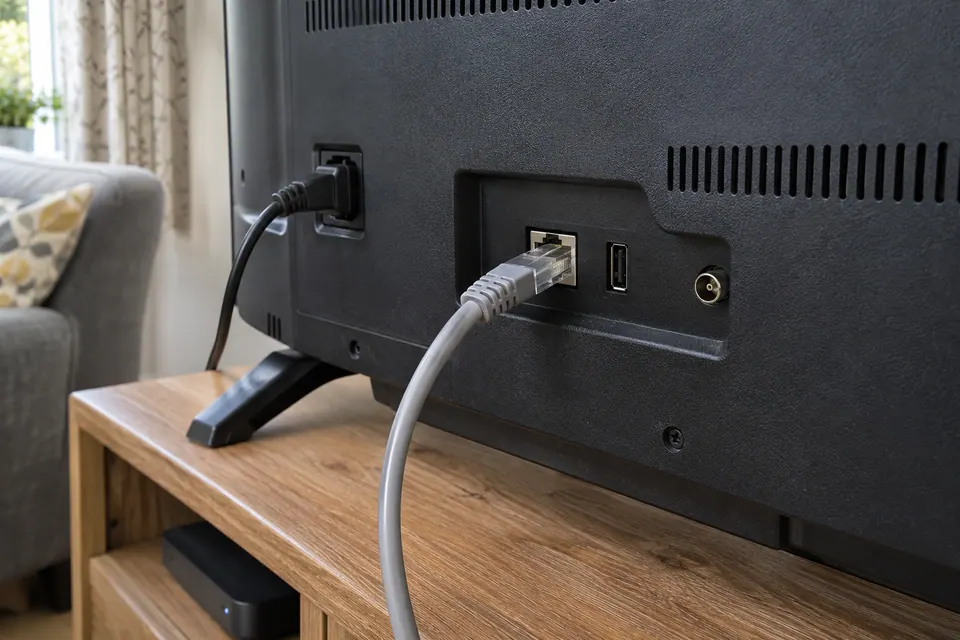
Where the playback device supports Ethernet, use a known-good lead to the router or a proven switch path. Route a temporary lead safely for the short comparison. Follow the device menu to confirm the selected connection; plugging in a cable does not prove the app switched from Wi-Fi. Repeat the same programme and quality after the connection settles.
If wired playback works repeatedly and Wi-Fi fails in the same position, the wireless hop or the device’s wireless implementation becomes the useful branch. Check the TV’s connected access point and the mesh node’s upstream connection where the equipment exposes them. A nearby mesh satellite can show a strong local signal while its backhaul is poor. A 100 Mbps TV Ethernet port is also not automatically faulty simply because the broadband service is gigabit.
Compare household load and the application
| Small comparison | What to learn |
|---|---|
| Same stream with voluntary backups paused | Whether competing transfers contribute. |
| Same service on another device | Whether the symptom follows the playback device. |
| Another app on the same TV | Whether the failure is service-specific. |
| Same device on supported wired and Wi-Fi paths | Whether removing the wireless hop changes playback. |
Change one condition and return to the original task. If lower quality plays reliably, record that useful fact without declaring a precise throughput fault. Adaptive quality, app behaviour and service load can also affect what you see. Do not disable household security or install unofficial player software to make a test work.
Choose a fix that addresses the comparison
Use the manufacturer’s supported app and system updates when the problem follows one device. Restart the playback device according to its instructions before escalating to a full reset. A reset can remove logins, settings and accessibility preferences. Retain the error and account recovery information before taking a disruptive step.
If the wired comparison consistently solves the problem, consider a safe permanent lead or improved access-point placement. If every device and service degrades while the household is busy, investigate capacity and traffic timing. Buy a faster package only when that evidence supports it. Finish by watching the original programme at the desired quality for a representative period, including the evening conditions that previously failed. A brief burst of headline speed is weaker proof than sustained playback.
Keep a comparison record
Record playback behaviour as well as any diagnostic number. Compare the actual streaming device, connection and programme rather than mixing results from different devices.
Fields: Time and timezone; TV or streamer model; App and programme; Selected quality; Connection and access point; Other household transfers; App network-check result; Playback before and after.
Download the blank CSV worksheetQuestions that change the next step
Is a 100 Mbps Ethernet socket too slow for 4K Netflix?
Netflix’s currently documented 4K recommendation is well below 100 Mbps, but usable throughput and stability still matter. Confirm the exact device, service and actual playback result.
Will a new mesh node behind the TV fix buffering?
Only if it has a healthy upstream path and improves the TV’s connection. Test a position with good backhaul before buying or adding another wireless hop.
Continue with the evidence you have
- Check mesh Ethernet backhaul
- Why evenings can behave differently
- Compare mesh, an extender and Ethernet
Start with the free connection checks →
Use the devices you already have for the first comparison. If a physical cable question remains, the equipment selector explains the capability to check before a purchase.
Questions before you change anything
Why does my TV buffer when the phone speed test is fast?
The TV can use a different radio path, network band, application server and hardware limit. Test the TV’s actual app and content rather than treating the phone’s result as the TV’s measurement.
Is the TV’s 100 Mbps Ethernet port necessarily too slow?
Not automatically. Compare stream bitrate, sustained throughput, buffer behaviour and other traffic. A 100 Mbps specification can be normal hardware design; it is not proof of a bad cable.
Should I use Ethernet or Wi-Fi for the television?
Run a safe wired comparison and compare same title, same app and same time. A stable wired path may help even with a lower headline rate, but it cannot repair an app-side fault.
Why does only one streaming service buffer?
Check service status, app version, account state and content-specific failure. If other services work under the same conditions, follow the service branch before buying networking hardware.
Would a mesh node next to the TV help?
Only with adequate backhaul quality, a suitable node position, supported Ethernet output and a useful before-and-after test. A node beside the TV can still have a weak upstream link.
Questions and source links reviewed 21 November 2026. The answers apply the limits described in this guide; they are not a test of your equipment.
Sources and scope
These original steps combine the references below with a practical comparison sequence. Follow the current instructions for the exact device and service. Images are labelled AI illustrations; they are not measurements or product tests. Read our evidence policy.
Reader questions that informed this update: Reddit: reader discussion · Reddit: reader discussion. Individual reports help identify questions; answers above use the technical references in this guide.
Details worth checking
Which TV details should I send if a wired comparison still buffers?
Include the TV model, streaming-device model if separate, app version, programme, quality setting and time. Check the app’s service status and the manufacturer’s supported firmware update route. A current app on an unsupported TV can behave differently from a phone; a successful Ethernet test cannot establish device compatibility.
Explain your own result
Replace the brackets with observations you actually made. Leave unknowns as “not checked”. This draft is written for this guide; it is not a quotation or an automatic diagnosis.
TV/streamer [model] has [buffering/crash/login error] in [app/title/quality]. Another title [result], other app [result], same service on second device [result], TV Wi-Fi/Ethernet [results], household traffic [state]. Help choose app, local path or service support.
Copying stays on your device. Remove passwords, account numbers and private network details before sharing.
Reader questions that informed this update: Reddit: reader discussion · Reddit: reader discussion. Individual reports help identify questions; answers above use the technical references in this guide.