1. Draw the two links separately
A mesh connection commonly contains a client link and a backhaul. The client link joins your phone, laptop or console to a node. The backhaul joins that node to the main network, directly or through another node. Either link can be wired or wireless, depending on the system and installation.
This distinction explains a common surprise: plugging a console into the upstairs satellite removes the console’s Wi-Fi hop, but does not necessarily remove the satellite’s wireless hop downstairs. Likewise, a phone stays wireless even when the node behind it has a wired backhaul. Label both links before interpreting a speed result.
| Connection | What still needs checking |
|---|---|
| Laptop to satellite Ethernet port | Whether the satellite backhaul is wired or wireless. |
| Satellite to a wall socket | Where the other end goes and whether the app reports wired backhaul. |
| Satellite to supported LAN path with wired status | Client association, negotiated link rate and the task result. |

2. Check the operating mode before moving cables
Read the documentation for the exact model, hardware revision and firmware. Router mode and access-point mode can require different topologies. The main node’s WAN-facing connection and LAN-facing connection have different roles; a spare-looking socket is not automatically interchangeable.
For supported TP-Link Deco models, the vendor says to set units up in the same mesh first. In Router mode, satellite units connect downstream of the main Deco’s LAN port, directly or through its LAN switch. In Access Point mode, the upstream router performs routing and the permitted wiring differs. These are Deco instructions, not universal rules for every mesh brand.
Do not add parallel cables to “make it faster”. An unsupported second path can create a loop. Photograph or sketch the original wiring, confirm which device is routing, and change one link at a time. Leave managed-network configuration to the person responsible for it.
3. Confirm the node’s connection in the app
- Open the network map and select the satellite, rather than only the client device.
- Look for the manufacturer’s backhaul or connection-type indicator. In the Deco documentation, the satellite details show how it is connected.
- Record the operating mode and the node status before and after connecting the intended Ethernet path.
- Confirm which node serves the test device. A device may remain associated with another node even when it is physically closer to this one.
An app status is stronger evidence of the chosen backhaul than a faster internet test alone. A speed increase can have several causes, and a slow broadband plan can hide a local improvement. If the app does not expose the connection type, follow that model’s documented diagnostic procedure rather than assuming the cable was adopted.
4. Compare a known-good short cable with the installed run
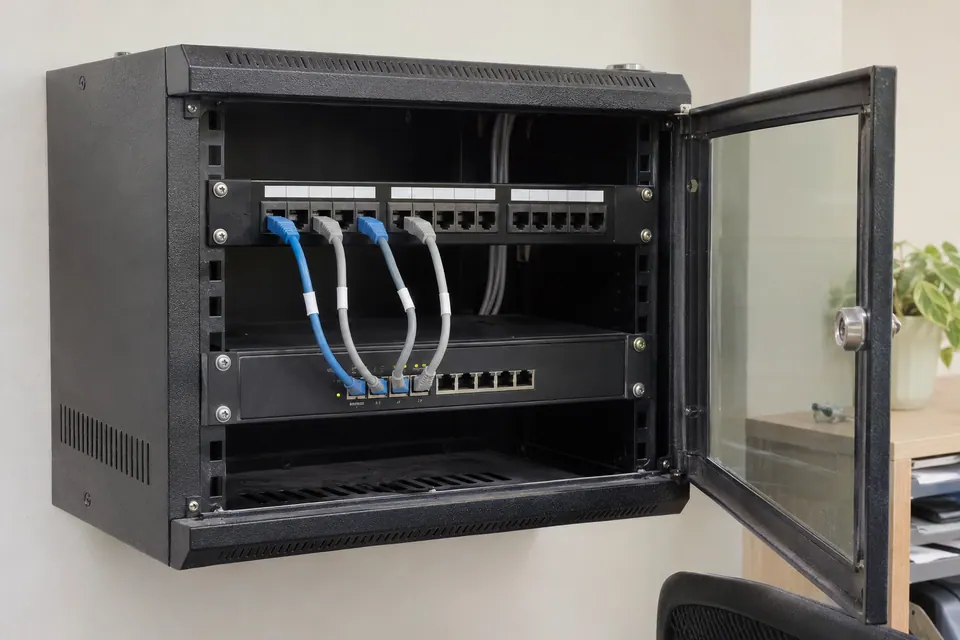
If the vendor permits it, temporarily join the two relevant nodes with a known-good short patch cable in the documented topology. Confirm wired status, then repeat the same device test. Keep the temporary cable out of walkways and do not disconnect equipment needed by other users.
Next substitute the installed wall run. If the short cable works and the wall run does not, investigate patch leads, wall-port mapping and any intermediate switch. Where practical and supported, compare without the intermediate switch. Do not start disabling switch loop protections as a generic remedy; a loop or unsupported topology needs to be understood first.
If the app shows wired backhaul but the link is limited to 100 Mbps, check both node port specifications and the cable path. A basic continuity result is not proof of gigabit capability. The wall-socket and 100 Mbps guides below cover that next stage.
5. Retest the room’s actual task
Return the node to its intended place and repeat the call, game or transfer that was unreliable. Use the same device and note its serving node. A wired backhaul can remove one wireless dependency, but client coverage, interference, broadband capacity and remote services still affect the result.
Mixed backhaul can be sensible: a system may support some wired nodes and some wireless ones. There is no need to cable every room simply to make the diagram look uniform. Keep the arrangement that provides reliable service, is supported by the vendor and can be explained clearly to the next person maintaining it.
Keep the result, not just the impression
Common questions
Can I mix wired and wireless mesh nodes?
Some systems, including the supported Deco setups in the cited guide, allow it. Confirm your model’s supported topology and check each node’s actual connection type.
Why does wired backhaul not make my phone much faster?
The broadband rate, the phone’s own Wi-Fi link or the selected node may be the limiting factor. Verify node status first, then compare the same task in the same location.
Sources and scope
Related checks
- Choose mesh, extender or powerline
- Wi-Fi works downstairs but not upstairs
- Check the wall run behind a node
Questions before you change anything
How do I know whether my mesh is using Ethernet backhaul?
Read the mesh app’s backhaul status, verify node topology, check port link rate and compare the wired path. A cable plugged into the node does not guarantee that the system selected it for backhaul.
Why does the mesh still say wireless with a cable attached?
Check supported topology, WAN/LAN port choice, intermediate switch and firmware guidance. Some systems require particular connection order or port arrangements. Use their documentation before changing the network.
Can I loop two mesh nodes together for more reliability?
Avoid undocumented network loops. Check spanning-tree support, vendor topology rules and switch configuration. Extra cables can disrupt the network rather than provide useful redundancy.
Why is wired backhaul only running at 100 Mbps?
Compare known-good short lead, port capability, installed-run quality and negotiated speed. Trace the physical path before assuming the mesh radio or provider connection is at fault.
How do I verify that Ethernet backhaul improved things?
Repeat the same room test, client device, busy-hour workload and interactive task. Record both the system’s reported backhaul mode and the application outcome; one speed result does not describe roaming reliability.
Community scenarios behind these checks
- Reddit: all eight conductors passed, but several runs negotiated at 100 Mbps
This is a reported installation problem, not a WireTrace test. Check endpoint capability and substitute a known-good lead before reterminating or replacing a fixed run; continuity does not certify transmission performance.
Questions and source links reviewed 21 November 2026. The answers apply the limits described in this guide; they are not a test of your equipment.

Reader questions that informed this update: Reddit: reader discussion · Reddit: reader discussion. Individual reports help identify questions; answers above use the technical references in this guide.
Explain your own result
Replace the brackets with observations you actually made. Leave unknowns as “not checked”. This draft is written for this guide; it is not a quotation or an automatic diagnosis.
Mesh [model/firmware] runs in [mode]. Layout is [WAN/LAN/node/switch path]. Satellite status before [state], short-cable comparison [state/result], installed run [state/result]. Help check the supported topology without creating a second path or disabling loop protection.
Copying stays on your device. Remove passwords, account numbers and private network details before sharing.
Reader questions that informed this update: Reddit: reader discussion · Reddit: reader discussion. Individual reports help identify questions; answers above use the technical references in this guide.