
Repeat the free internet speed test over Ethernet after checking the negotiated link rate. Keep that rate with the saved result when comparing it with your package.
Check the negotiated rate on the device
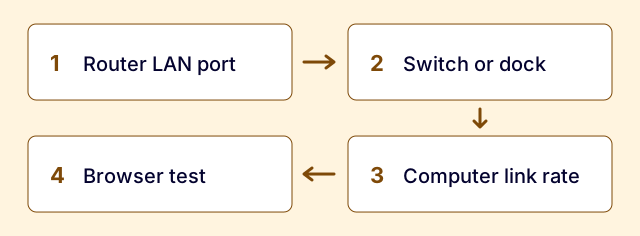
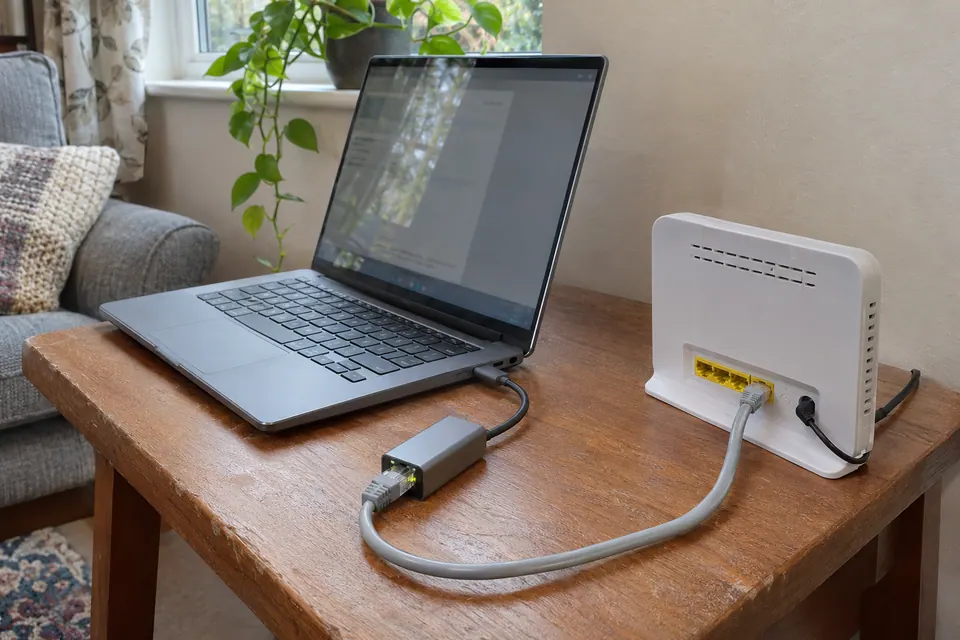
Start with a computer directly wired to a LAN port on the router. Check network settings for Ethernet link speed. If it reports 1.0 Gbps and repeated tests land near 940 Mbps, that is consistent with a gigabit link. 1 Gbps is the line rate; a speed test reports the data it can move through the full path.
Check that every link can support the rate you expect. A laptop dongle, dock, intermediate switch or router LAN port can all set a limit. A link at 100 Mbps is a different symptom. Compare a known-good short lead and another suitable port before assuming the internet plan has changed.
Compare like with like before calling it a fault
Pause large transfers, run a wired test and repeat it when the connection is quiet. Save the time, server or test service, link rate and whether you used a direct lead. Check the provider’s own test and the expected speeds it quoted for your address.
Browser, device and test server capacity can also influence the result. A single reading at 940 Mbps does not certify your cable or establish that every device will see that speed. A much lower result that persists across quiet wired tests deserves separate checks.
What needs to change to measure more than 1 Gbps?
To exceed a gigabit on one device, the broadband package must support it and the whole path to the computer must offer more than 1 Gbps. Check the specific LAN port, switch if present and computer adapter. A router may have a faster WAN port and still use 1 Gbps LAN ports for clients.
If your normal work already runs well, there is little reason to buy a tester or replace cable because the result says 940 rather than 1000. If the link is negotiating below what each device supports, diagnose that link first. A basic wiremap tester can help with wiring continuity on an isolated run; it does not qualify the cable for the target speed.
Common questions
Will Cat 8 cable make a 1 Gbps port faster?
Changing a suitable lead cannot raise the rate supported by the port. Check the negotiated rate and compare with a known-good lead if you suspect a physical fault.
Why does my router app show more than my laptop?
A test running on the router may measure the broadband side without using the laptop, its adapter or the LAN link. Record where each test runs before comparing the results.
Questions before you change anything
Is around 940 Mbps normal on gigabit Ethernet?
It can be consistent with a 1 Gbps link after protocol overhead. Check test method and provider estimate; a browser result is not expected to equal the raw Ethernet signalling rate exactly.
Why does a 1.2 Gbps plan stop near gigabit on my laptop?
Check router LAN speed, Ethernet adapter rate, dock capability and intermediate switches. A single 1 Gbps hop limits that path even when the provider delivers more aggregate capacity.
Would a Cat8 cable make my gigabit port faster?
No. The port hardware, negotiated rate, endpoint capability and network topology set the relevant limit. Replace a defective lead when demonstrated; a category label cannot upgrade a port.
Why is the router’s own test faster than the browser?
It omits parts of the client path. Compare Wi-Fi conditions, CPU performance and browser load. Use the same test destination and time where possible before treating the difference as lost provider capacity.
When should I invest in 2.5 gigabit networking?
Identify a task limited by single-device throughput, NAS transfers, multi-gig ports and storage speed. Upgrade the whole relevant path only when the expected benefit is useful, not to remove an otherwise normal overhead gap.
Questions and source links reviewed 21 November 2026. The answers apply the limits described in this guide; they are not a test of your equipment.

Reader questions that informed this update: Reddit: reader discussion. Individual reports help identify questions; answers above use the technical references in this guide.
Details worth checking
Why is upload lower than download, and do I need a faster Ethernet port?
Check the package’s separate upload specification: many services are asymmetric. A multi-gigabit service also needs suitable WAN, LAN, switch and adapter ports along the measured path. A 2.5 Gbps socket at one end cannot raise a 1 Gbps limit elsewhere. Compare each direction with the relevant service specification rather than assuming they should match.
Explain your own result
Replace the brackets with observations you actually made. Leave unknowns as “not checked”. This draft is written for this guide; it is not a quotation or an automatic diagnosis.
Copying stays on your device. Remove passwords, account numbers and private network details before sharing.
Reader questions that informed this update: Reddit: reader discussion. Individual reports help identify questions; answers above use the technical references in this guide.