
Use the free connection troubleshooter to record whether Wi-Fi disconnects on one device, within one room or across the home, and whether a wired device stays online.
Check the status while it is happening
Open the Wi-Fi menu as soon as the connection stops. Is your usual network still selected? If the indicator disappears and then comes back, the device may have lost the wireless link. If it stays connected and several apps stop loading, the router or upstream connection may be involved.
Write down the time, room and whether the device had just moved or woken from sleep. On a phone, make sure it is still using Wi-Fi before treating it as a comparison. Mobile data fallback can hide the same failure.
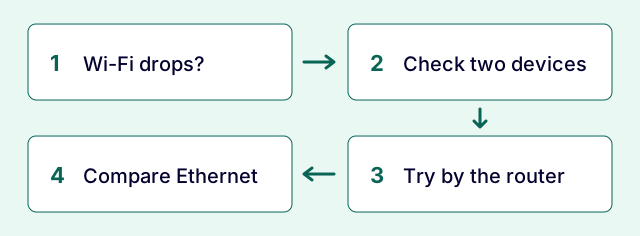
Use two devices and change one thing
Try the same page on a second device, on the same Wi-Fi and in the same place. If one device drops repeatedly while the other carries on, start with the affected device: save your work, restart it and check for network updates from its vendor. For a work device, give the timings to IT before changing the network profile or security settings.
If both devices drop in the same room, repeat by the main router. A fault that disappears close to the router points you towards the wireless path, especially if it follows movement between rooms. Check access point or mesh placement before buying anything.
If both fail even beside the router, compare Ethernet to the main router if you can. If Ethernet stays usable while Wi-Fi drops, focus on the wireless side. If Ethernet also fails at the same time, check the provider status and note any change in the router or fibre box lights using the model manual.
How to catch a fault that fixes itself
Record the exact start time and approximate duration of two or three drops. Note what stayed connected and whether anyone else was affected. For example: 19:42, laptop Wi-Fi icon disappeared for 25 seconds, phone stayed on the same Wi-Fi, both on the same desk.
After each change, repeat the original task long enough that you would normally see the fault. A good reading between drops is only a snapshot. Keep a note of what you changed so you can undo it if it did not help.

Common questions
Should I reset my router when the Wi-Fi drops?
Start by comparing devices and recording the status lights. A scheduled restart may be useful later. A factory reset removes settings and can interrupt other users, so follow the provider or administrator instructions before doing one.
Can a speed test catch the drop?
It may show an interrupted measurement if the drop occurs during the run. It cannot tell you which device or link disconnected. Record the Wi-Fi status while the problem is visible.
Questions before you change anything
How do I tell Wi-Fi disconnection from an internet dropout?
Record whether Wi-Fi association, router reachability, WAN status or just the application session disappears. Those boundaries point to different next tests, even when the user sees the same spinning icon.
Why does Wi-Fi disconnect only in one room?
Compare room position, access-point identity, signal level and roaming events. Repeat with the same device near the router before changing the provider plan.
Could my laptop’s power saving cause the drops?
Check the maker’s adapter driver, power-management settings, sleep/wake behaviour and event logs. Make a documented reversible change; a setting that helps one model is not a universal fix.
Should I split 2.4 GHz and 5 GHz into different network names?
First investigate band steering, client compatibility, mesh behaviour and the failure pattern. A temporary vendor-supported split can be informative, but keep a record and restore the intended configuration if it does not help.
When is replacing the router justified?
Compare multiple devices, wired stability, near-router operation and firmware support. A failure confined to one old client or distant room needs different evidence from repeated router-wide outages.
Questions and source links reviewed 21 November 2026. The answers apply the limits described in this guide; they are not a test of your equipment.
Reader questions that informed this update: X: a reported connection symptom · Reddit: reader discussion. Individual reports help identify questions; answers above use the technical references in this guide. The public X question was visible; sign-in-restricted replies were not used.
Details worth checking
Should I rename the Wi-Fi network or update the router first?
Save the current network name and relevant settings. Check official firmware release notes for your exact router and adapter before scheduling an update. Renaming a network can force many devices to rejoin and obscure the original fault; record roaming, sleep and WAN evidence first, then make one documented change at a time.
Explain your own result
Replace the brackets with observations you actually made. Leave unknowns as “not checked”. This draft is written for this guide; it is not a quotation or an automatic diagnosis.
Copying stays on your device. Remove passwords, account numbers and private network details before sharing.
Reader questions that informed this update: X: a reported connection symptom · Reddit: reader discussion. Individual reports help identify questions; answers above use the technical references in this guide. The public X question was visible; sign-in-restricted replies were not used.